William Schilthuis Renderman -  Special Occlusion  

Visual.Effects.Artist


Download files here:

RSL Surface Shader Source:

- wgsBakePTC.sl

RSL Light Shader Source:

- wgsOcclusionLight.sl

RIB Test Scene:

- wgsOcclusionLight.rib

Reel / Blog / About

Below is a discussion of how occlusion can be generated directionally from a custom LightSource shader.

Also discussed are methods for baking Ambient Occlusion into a point cloud that can be referenced each frame, rather than raytracing and calulation AO per frame. This technique applies to scenes in which the camera moves, but the geometry does not.

This process was developed by programming shaders first and rendering small test RIBs with prman, then by integrating those shaders and methods into RenderMan for Maya using built-in passes and secondary outputs. This turned out to be the most significant challege of the project. I will discuss my experiments with workflow.

Additionally, I mention how moving objects can be added to the occlusion by creating object Sets like groups) and raytracing only the moving components.
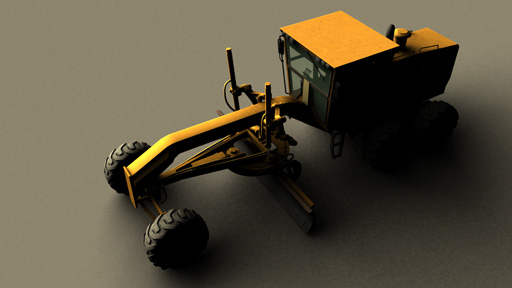


Pixar's AppNotes describe a shader to bake occlusion to a point cloud (.ptc). This is fast, effiient, adjustable, and does not incur raytracing artifacts (splotchiness on open surfaces):


Commented RSL shader HERE


To implement this we can create a simple RIB with two frames that:

1st Frame - uses the bakePTC shader to create a point cloud.

2nd Frame - reads the point cloud in the surface shader to reuse the occlusion. No raytracing.


Commented RIB file HERE


We can optionally change the RIB to use raytracing very easily. Notes on raytracing are commented in the RIB file.


The LightSource Shader used is "Directional Occlusion". Described here. Instead of casting shadows, this shader will cast occlusion. That is, it appears to be an ordinary directional light that casts very soft shadows.


Commented RSL shader HERE


1. If all goes well, this technique saves a lot of time. Including baking the point cloud, I experienced render times about 3x faster than with raytracing. That is not always the case, and the visual quality may be affected greatly by the quality of the .ptc


1. There are visual artifacts occaisionally. This is most likely due to a render setting in Maya as well as the quality of the baked point cloud. I did not thoroughly troublshoot these artifacts.

2. Moving Objects cannot be baked. Well, they can be baked, but there will be occlusion ghosting then. Artifacts where the object once was or missing occlusion.


Above is a pure color output, to show the animation occuring.
I did not render out all other investigations as movies.


Below I will discuss my experiments in workflow and the Pros and Cons of various methods.


First of all, when we hand code a RIB file, we can add multiple frames. This is like adding render passes. RenderMan for Maya has it's own method for constructing Render Passes, and each can have various Display outputs. On the other hand, Maya Render Layers exist as a way to perform a complete re-render, but with different scene options.


Next, when we want to bake a proper point cloud, we should incllude the following options for quality and speed (these are from the baking RIB demonstrated earlier):

Attribute "cull" "hidden" 0 # don't cull hidden surfaces
Attribute "cull" "backfacing" 0 # don't cull backfacing surfaces
Attribute "dice" "rasterorient" 0 # view-independent dicing

To implement this easily, we can go the the menu "RenderMan" > "Shared Geometric Attributes"

Now you can create and new SGA, add these attributes, and select and attach to the geometry you will be baking.


Third, in my scene I have a baking camera set up, just like in the RIB file. This is used only for baking the point cloud in the cleanest fashion.


As usual, to set up AOVs (custom secondary outputs), you must go to "Render Settings > Advanced > Default RI Options" to enable the extra channel(s):


Because I was trying difference workflows, the Directional Occlusion lighsource shader must be told exactly where the baked point cloud is. If you dont specify the point cloud, the light will try to raytrace occlusion. If raytracing is off, there will be a directional lightsource with no occlusion or shadows.


1. Save your current render objects to a new Maya Render Layer.

2. Use another Maya Render Layer to assign bakePTC shader as material override.

3. For your AObake layer, set up Layer Overrides for camera, caching behavior, etc..

4. Dont forget: After rendering the AObake layer, link the lightsource to the baked point cloud.

pros

+bake exactly what you want, once.

+this method works for Baked Occlusion

cons

-RFM has no direct obvious way to render pass with different shader (.ptc bake)

-Baking Shader must be applied, so Maya Render Layers must be used

-Maya Render Layers and RFM Passes aren't really designed for this

-Layer Overrides required often (Render Camera, shader, outputs...)

-Maya Render Layers means ALL Secondary Outputs will get rendered

-Secondary Outputs will not display any occlusion by default

-AOV for occlusion would have to be in all shaders


Here is the result:


it works, but it not very practical, especially for secondary outputs!


1. Go to Render Settings > Features > Environment Light. Click the box to create one

2. Turn the Environment color to black (you dont need this).

3. Right Click in the "Bake Shadowing" and create a "RenderRadiosity" pass.

4. In the RenderRadiosity pass, set the bake camera to the baking camera that exists.

5. Change point cloud calculation for "per job"

6. After calculating the point cloud once, now you can reference it in the lighsource shader

pros

+Premade Environment Light, easy set up

+Renderman Render Pass, easy to control

+Secondary Outputs easier to control***

+RFM Render Passes can have their own Secondary Displays, or not.

+No need to set up custom occlusion bake PTC shader***

cons

-Still requires: Render once, change settings, render animation.

-When baking AO from the directional light, directionality is baked

-Difficult to set up sepate raytrave pass for moving objects!

-Secondary outputs still can't output Occlusion pass (correctly)***

-proper AOV for occlusion would still have to be in all shaders


***At first I thought that I could easily output an IndirectOcclusion from my point cloud and secondary output and that is was the same as my bakePTC shader. This is not the case. Because the directional light is what generates the Occlusion, the RFM Render Pass bakes the DIRECTIONAL point cloud, and not the global occlusion information. This means that:

A-Baking the occlusion requires raytracing because the lightsource generates it.
B-The occlusion must be recalculated every frame if the light moves.

This process makes baking occlusion simple, but nearly useless. It is nice to use RFM Render Passes though and not mess with Maya Render Layers.


1. Apply PTCbake Shader to everything, Render once from bake camera.

2. Restore the original shaders to you scene.

3. Set the lightsource to reference the baked point cloud.

pros

+Manually rebaking is easier than remembering lots of render settings.

+bake Occlusion using your own shader

+No RFM Render Passes, (unless you can figure that out)!

+No Maya Render Layers

cons

-Secondary Outputs still can't display our occlusion by default

-AOV for occlusion would still have to be in all shaders

This is probably the most straight foreward, but not very production friendly.


1. If possible, set up a render pass like in the manual RIB,

2. Baking Render Pass should use Baking Camera, bakePTC shader automatically.

3. Beauty(Final) Render Pass should output desired secondary images

pros

+Easy to rebake or not.

+Easy to add Raytrace Pass for moving objects

+AOVs would be built into shaders, easy to output

+Gives artist control

cons

-not easy to create the Render Pass in the first place

-very easy to code a RIB, not a Maya scene. (should be the opposite)


Other issues that I did not addres are as follows:

- DirectionalOcclusion Shader requires absolute paths to point cloud

- Possible artifacts in the Directional Occlusion Shader itself, (see shader notes).

- Blocky artifacts when rendering occlusion from point cloud, this could be a Maya setting.


It would be great to have an easier way to implement a custom shader with a RenderMan for Maya Render Pass. This may be something that is possible, I just dont know how to do. I learn new things each time I browse the RenderMan documentation. If I figure it out in the future, I will post the results here. I would say this exploration was still a success, but a great challenge. Finding the best workflow for a production environment is important, and I think that what I've explored might save someone else time in the future.

Updated:June 16, 2011